

WordHero
Rating: ⭐️⭐️⭐️⭐️
Last Updated: November 17, 2026
WordHero is an AI writing assistant designed to generate blog posts, marketing copy, product descriptions, and social media content. The platform leverages natural language generation to accelerate content production workflows. Built for entrepreneurs and digital marketers, WordHero enhances productivity while maintaining readability and tone consistency. By supporting scalable content strategies, it strengthens online presence and engagement.
|
Category |
||
|
Free Trial |
7 Days |
|
|
Starting price |
$0 |
|
|
Use Case |
||
|
Best for |
This page contains affiliate links. We may earn a commission when you click links to our partners. But rest assured that our reviews are editorially independent and not influenced by commissions. Read Affiliate Disclosure
Jump to section:
Overview
WordHero Review: Is It Worth Paying For When ChatGPT Is Right There?
Here’s the question every prospective WordHero buyer is quietly asking: “I can already get AI to write my blog posts and ads. Why would I pay for another tool to do it?”
It’s a fair question. The honest answer isn’t “WordHero writes better.” It’s that most AI writing problems aren’t writing problems. They’re briefing problems.
Think about the last time you used a generic AI chat for marketing work. You explained your audience, your offer, and your tone. Then you did it again the next day. And again for the email, the ad, and the social post. By the fifth session, you were spending more time re-explaining your business than writing anything.
WordHero is built around fixing that. As someone who uses it to create social media posts, I can attest that it has saved me a lot of time. But that might not be enough to justify the monthly subscription price. So in this post, my goal is to give you an idea of its capabilities and help you decide whether it’s worth having in your tool stack.
⚡ Quick Verdict
WordHero is an AI content workspace for marketers. It generates blog posts, ads, emails, social posts, product descriptions, landing page copy, SEO briefs, and images, and it organizes them around saved project context.
Best for: small businesses, freelance marketers, bloggers, agencies, and lean teams that produce recurring content across several channels.
Its real advantage: workflow organization. Your audience, brand voice, drafts, templates, and campaign assets live together instead of scattered across chat threads.
Skip it if you need enterprise governance, deep SEO research, GTM automation, or one AI assistant that handles far more than marketing content.
The catch: WordHero helps you draft faster, but it doesn’t remove the need for editing, fact-checking, SEO judgment, or human strategy. Output quality still depends on your brief and your review.
So, WordHero or ChatGPT?
Let me answer the question I opened with directly.
ChatGPT is more flexible. It handles reasoning, research, data analysis, coding, and open-ended conversation. ChatGPT Plus is listed at $20/month.
WordHero is more structured for marketing. You set your project context once, so the platform remembers your audience, tone, offer, and brand voice, and you build assets from there.
Pick WordHero if repeating yourself is your biggest time sink and you want campaign assets organized in one place. Stick with a general assistant if you want maximum flexibility and you’re happy managing your own prompts.
What Does This Tool Do?
On the surface, WordHero generates marketing content: blog posts, ads, emails, social captions, landing page copy, product descriptions, SEO briefs, meta descriptions, and images.
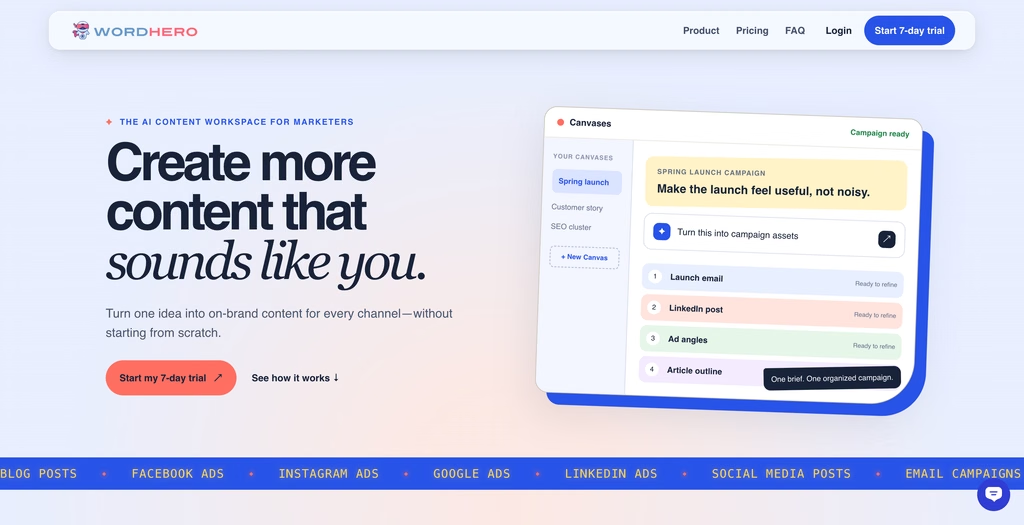
The better way to understand it is as a lightweight content production system. The current workflow looks like this:
- Reuse templates for repeatable work.
- Set up a project and add your audience, tone, and brand voice.
- Choose the assets you need.
- Generate drafts.
- Refine and organize the outputs.
Featured Deals and Offers
Offers, pricing, and promo codes can change without notice. Check the official website for the latest terms.
Get WordHero offer alerts
Be the first to know about new deals, discounts, and trial offers for WordHero.
Use Cases
Who Should Use This Tool?
Solo marketers. The problem usually isn’t “I need one perfect article.” It’s “I have to publish something useful every single week.” WordHero suits that rhythm.
Small businesses. You probably don’t have a content team. WordHero turns rough ideas into usable drafts, campaign assets, and social posts faster than writing everything manually. It cuts blank-page friction, though it doesn’t replace strategy.
Freelancers and agencies. Client work is repetitive by nature, and Projects, Brand Voices, custom templates, and Canvases help with that. If you regularly create blog outlines, launch emails, ad angles, or product descriptions, templates make the workflow more efficient.
Bloggers and affiliate publishers. The SEO article workflow takes you from keyword to brief, outline, draft, featured image, and WordPress draft. You’ll still need to fact-check, edit heavily, add firsthand perspective, and avoid publishing generic output.
Ecommerce marketers. Product descriptions, ads, landing page copy, emails, and social content in many variations. It’s a copy production assistant, not a product information system.
Who Should Look Elsewhere?
Larger marketing teams needing governance. Jasper is the better fit, with stronger collaboration, workspace controls, brand governance, and Business-plan features like SSO, custom style guides, API access, and marketing agents.
Go-to-market teams. Copy.ai has moved toward GTM AI workflows, including workflow credits, integrations, bulk workflow runs, and enterprise implementation. If you need sales enablement or prospecting automation, look there.
Budget users who need simple writing. Rytr is cheaper and simpler, with a free plan and an Unlimited plan from $7.50/month billed annually. For quick rewrites, captions, and short-form copy, it may be enough.
SEO teams tracking AI search visibility. Writesonic has shifted toward SEO and generative engine optimization, with brand tracking across ChatGPT, Gemini, and Google AI Overviews, plus site audits and sentiment analysis.
People who want one flexible assistant. A general AI assistant like ChatGPT handles broader reasoning, research, data analysis, and coding. WordHero is purpose-built for marketing content.
Key Features and Benefits
Canvases. One of the more useful workflow features. A Canvas turns one idea into multiple related assets, such as an email, a LinkedIn post, a Facebook ad, and an article outline, all kept together. The payoff is campaign consistency, since you generate related pieces from the same brief instead of writing each separately and stitching them together later.
Project Memory. You add your business, audience, and brand voice once, and the platform remembers it. This is the feature that answers the ChatGPT question. If the AI doesn’t know your audience, offer, proof points, or tone, the output goes generic. Reusable context fixes the root cause.
Brand Voices. The help center says you can train the AI to imitate your writing style. That helps small teams without a formal style guide still sound recognizable. It reduces cleanup but doesn’t eliminate it.
Custom templates. Save repeatable prompts and workflows, such as customer story openers, product description frameworks, email launch sequences, social repurposing prompts, blog intro frameworks, and ad angle generators. This is what makes WordHero more useful than a one-off generator, especially for agencies and freelancers.
SEO articles. Keyword research, briefs, full drafts, section refinement, featured images, and WordPress drafts. It helps with production, not rankings, and WordHero itself says rankings depend on factors outside the product, such as competition, site quality, and distribution. Every AI-written SEO article still needs search intent review, original insight, internal links, source verification, brand examples, and editing for accuracy.
Long-Form Editor. Generate and edit side by side, with Keyword Assistant, Content Ideas, History, document saving, Blog Outline, Blog Paragraphs, Write More, and Command Mode. Writing is rarely one click, so this makes WordHero more practical for long content than tools that only produce snippets.
WordHero Chat. A flexible mode for tasks that don’t fit a template, like ideation, rewrites, and quick variations.
WordHero Art. Text-to-image in square, landscape, and portrait formats for campaigns, social posts, and featured images. It’s a convenience feature, so brands with strict design standards still need a designer.
Multilingual content. 108 languages, with 109 locale options because English comes in US and UK variants. Good for rough drafts across markets, but have fluent speakers review translation quality, cultural nuance, and local compliance.
User Experience
Setup and Ease of Use
WordHero gives you two ways in. Which one you pick depends on whether you want control or speed.
Path 1: Start with context (for detailed, customized output)
The first screen you see is labeled “Start with context,” and it asks you to create your first project. You can set it up two ways.
Start with your website. Paste in your URL and click Analyze website. WordHero suggests a project profile, a writing style, and your first six content topics, and you can review everything before the project is created. For anyone who dreads filling in a blank brief, this is a smart shortcut.
Set up manually. You enter a project name, describe what the project is about, and optionally say who you’re writing for. The placeholder example is “marketing leaders at growing SaaS companies.” That’s a useful hint about how specific you should be.
This path is where WordHero’s Project Memory idea shows up in practice. You build the context once, and the content you generate afterward can draw on it. If you want output that reflects your audience, offer, and tone, this is where to put in the effort. Don’t skip the optional audience field. A vague audience produces vague copy, and that’s the generic AI sound you’re trying to avoid.
The Setup section of the sidebar also lists Projects, Brand Voices, and Templates, so your customization tools sit in one place.
Path 2: Quick Create (for fast output)
If you just need something written, skip the project and open Quick Create. The page tells you to choose a tool, add the essentials, and get your copy. There’s a search bar at the top, so you can type something like “Facebook ads” and jump straight to it.
The tools are grouped into 13 categories:
- Blog Article: topics, headlines, outline, introduction, section, conclusion, listicle
- Email Campaign: subject lines, cold email, welcome email, promotional email, follow-up email
- Advertising Campaign: Google Ads, Facebook and Instagram Ads, LinkedIn Ads, ad hooks
- Landing / Sales Page: hero section, AIDA, PAS, and HSO copy, FAQ, guarantee, call-to-action
- SEO Content: keyword ideas, search intent, SEO content brief, SEO title, meta description
- Also covered: Business & Career, New Business / Brand, Writing Essentials, Creative & Lifestyle, Social Media, Product Marketing, Rewrite & Improve, and Video & Creator
Two details I like: You can star tools to favorite them, and there’s a Custom section with a “Manage templates” link for your own saved templates. Buttons for Recent generations and Canvases sit at the top right, so past work is easy to find.
One thing to notice is how finely the blog tools are split. Instead of one “write my article” button, you get separate tools for the outline, introduction, body sections, and conclusion. That gives you more control over each piece, but it also means building a long article takes several steps.
Getting around
The sidebar is clean. Under Workspace you get Home, Quick Create, Canvases, Art, Documents, and Keywords. Under Setup you get Projects, Brand Voices, and Templates. Nothing feels buried.
There’s also a credit meter in the sidebar. It shows your Enhanced credits as a percentage remaining, with a reset date and an “Earn credits” link. Since Enhanced Mode is metered, having your usage visible at all times is a practical touch.
Which path should you take?
- Start with context if you publish recurring content, manage client work, or care about brand voice and specificity. You’ll spend more time upfront and less time re-explaining later.
- Use Quick Create if you need a single ad, subject line, meta description, or caption right now, or you’re simply testing the tool.
- Use both once your project is set up. Build the context for your main work, and reach for Quick Create when you need a fast one-off.
Suffice to say that with WordHero, you’re unlikely to encounter issues with the technical learning curve. Just like most AI writing tools out there, your main problem would be editorial. Either path still depends on knowing what a good brief looks like, what your audience cares about, and when a draft isn’t ready to publish.
Pricing and Value
| Plan | Price | Main fit | Important limits or notes | Action |
|---|---|---|---|---|
| Free | $0 | Testing Pro features before you commit | 7 days | Get FREE trial |
| Starter | $19 | Solo marketers and freelancers | 1 project and 1 brand voice, 20 keyword searches/month, 20 image credits/month | Visit website |
| Pro | $39 | For marketers turning more briefs into finished campaigns | Everything in Starter + Enhanced AI usage, Articles, and custom templates. 3 projects and 5 brand voices, 100 keyword searches and 100 image credits each month | Visit website |
| Business | $79 | Small businesses, In-house marketing teams | Everything in Pro + Advanced workflows, 500 keyword searches, and 900 image credits, 10 projects and 20 brand voices, up to 3 team members | Visit website |
WordHero offers 3 plans to choose from depending on your needs:
- Starter: $19/month. One project, one brand voice, unlimited fair-use Standard writing, 20 keyword searches a month, and 20 image credits. Good for solo marketers building a basic content system.
- Pro: $39/month. Three projects, five brand voices, Enhanced AI usage, Articles, custom templates, 100 keyword searches, and 100 image credits. The practical tier for recurring campaigns and articles.
- Business: $79/month. Ten projects, 20 brand voices, advanced workflows, 500 keyword searches, 900 image credits, and up to three invited team members.
What that costs per year: You can save up to 25% on WordHero by paying annually. Starter is $180, Pro is $348, and Business is $708.
Trial: every plan starts with a seven-day trial, requires a card, and can be cancelled before day seven to avoid being charged.
The fair-use catch. Take note that “Unlimited” on WordHero still has limits. The help center says its AI provider enforces rate and usage limits that vary by tool, and that fast or repeated generations can temporarily affect speed or quality. If you generate responsibly and edit between generations, that likely won’t matter. If you’re planning high-volume automated production, expect friction.
Is it good value? If it saves you from re-briefing the AI every session and keeps your campaign assets organized, Starter or Pro can pay for itself quickly.
Pros and Cons
Strengths
- Good fit for small teams, structured around practical workflows instead of enterprise complexity
- Canvases keep campaign assets together
- Project Memory and Brand Voices reduce repeated briefing
- A useful long-form workflow with outlines, paragraphs, keyword help, and saved documents
- A beginner-to-intermediate SEO workflow, from keyword to WordPress draft
- An affordable entry point compared with premium AI marketing platforms
- 108-language support and built-in image generation
Trade-offs
- Not a full SEO platform. It doesn’t replace tools for competitive analysis, technical SEO, rank tracking, or AI search visibility.
- Not enterprise-grade. Larger teams may need stronger governance, approvals, permissions, and integrations.
- Output still needs editing for accuracy, originality, tone, and usefulness.
- Fair-use limits apply. Unlimited doesn’t mean unlimited automated generation at any speed.
- Brand Voices need review. They help, but they don’t guarantee publish-ready copy.
- Not for heavily regulated industries. Legal, finance, healthcare, and compliance-sensitive teams need stricter review.
- Image generation is a convenience, not a replacement for a design system.
Frequently Asked Questions
Is WordHero good for blog writing?
Yes, for outlines, drafts, SEO briefs, keyword-supported content, and WordPress drafts. Use it as a drafting assistant, not a one-click publishing engine.
Does it replace a copywriter?
No. It reduces drafting time and generates variations, but strategy, accuracy, persuasion, differentiation, and brand nuance still need a human.
Is it good for SEO?
For basic content workflows, yes: keyword research, briefs, drafts, and WordPress drafts. It doesn’t replace dedicated tools for technical SEO, link analysis, competitive research, rank tracking, or AI search visibility.
Is there a free trial?
Yes, seven days on every plan, with a card required.
How much does it cost?
Starter is $15/month, Pro is $29/month, and Business is $59/month, all billed yearly. Verify live checkout pricing before subscribing.
Does it support teams?
Yes, the Business plan supports up to three invited team members.
Does it support multiple languages?
Yes, 108 languages with 109 locale options.
Bottom Line
WordHero won’t replace your judgment. What it does is save you from rebuilding your brief from scratch every time, and it keeps your drafts, templates, and brand context in one place.
Buy WordHero if you’re a solo marketer, small business, blogger, freelancer, or agency that wants structured AI writing with brand memory, campaign organization, templates, and SEO article support at an affordable price.
Skip it if you need enterprise governance, deep SEO analytics, GTM automation, or a general-purpose AI assistant that does far more than marketing content.
If you’re tired of explaining your business to a blank chat box, WordHero is worth a trial. Just use the seven days properly, and cancel before day seven if it doesn’t earn a place in your workflow.
Overview
⚡️Quick verdict
What is
WordHero
Featured deals and offers
Offers, pricing, and promo codes can change without notice. Check the official website for the latest terms.
WordHero
is best for
Who should look elsewhere
WordHero
key features and benefits
Problems Solved
WordHero
user experience: what using it feels like
WordHero
pricing and value
| Plan | Price | Main fit | Important limits or notes | Action |
|---|---|---|---|---|
| Free | $0 | Testing Pro features before you commit | 7 days | Get FREE trial |
| Starter | $19 | Solo marketers and freelancers | 1 project and 1 brand voice, 20 keyword searches/month, 20 image credits/month | Visit website |
| Pro | $39 | For marketers turning more briefs into finished campaigns | Everything in Starter + Enhanced AI usage, Articles, and custom templates. 3 projects and 5 brand voices, 100 keyword searches and 100 image credits each month | Visit website |
| Business | $79 | Small businesses, In-house marketing teams | Everything in Pro + Advanced workflows, 500 keyword searches, and 900 image credits, 10 projects and 20 brand voices, up to 3 team members | Visit website |