

UXPilot AI
Rating: ⭐️⭐️⭐️⭐️
Last Updated: October 26, 2026
UXPilot AI is an AI-powered UX/UI design platform built to help teams generate wireframes, high-fidelity screens, product flows, and prototypes faster than starting from a blank canvas.
Its strongest use case is not replacing designers. It is helping product managers, founders, agencies, and design teams create something tangible enough to critique, refine, and move into Figma or a development workflow.
UXPilot is especially relevant if your team needs to move from product idea to screen flow quickly, but still expects a designer or product lead to review hierarchy, brand fit, content, and usability before anything ships.
|
Category |
||
|
Free Trial |
Forever |
|
|
Starting price |
$0 |
|
|
Use Case |
||
|
Best for |
This page contains affiliate links. We may earn a commission when you click links to our partners. But rest assured that our reviews are editorially independent and not influenced by commissions. Read Affiliate Disclosure
Jump to section:
Overview
UX Pilot Review: Fast Screens, Figma Workflows, and the Friction to Plan For
I used to create website wireframes and mockups from scratch. It was, as you can imagine, very time-consuming. Then I stumbled on UXPilot AI, and it became a game-changer in my workflow. This was in the early days of artificial intelligence so even UX Pilot at that time was often a hit or miss. Still, it considerably shortened the design process, and I’ve found it immensely useful at times when a client only wanted “a quick flow” or a usable concept.
In this UX Pilot Review, I am sharing my experience with using the tool so you can decide for yourself if it will be worth your while. I will examine the tool’s workflow, Figma compatibility, output quality, limitations, pricing, and ideal users.
⚡ Quick Verdict
UXPilot AI is best for teams that need speed-to-clarity: founders validating a product idea, product managers turning PRDs into screens, agencies preparing early client concepts, and UX/UI designers exploring alternate layouts before committing to a direction.
Like most AI design tools, UXPilot still needs strong prompts, clear constraints, and human judgment. So you’re in for disappointment if you expect AI to produce polished, production-ready product design with no human guidance.
What Does This Tool Do?
UX Pilot is primarily an AI wireframing and UI design tool. It can generate wireframes, screen flows, interface concepts, and high-fidelity designs from prompts, giving teams a starting point for a website, app, or digital product. Again, you still need to guide the output with business context, product constraints, and design-system requirements.
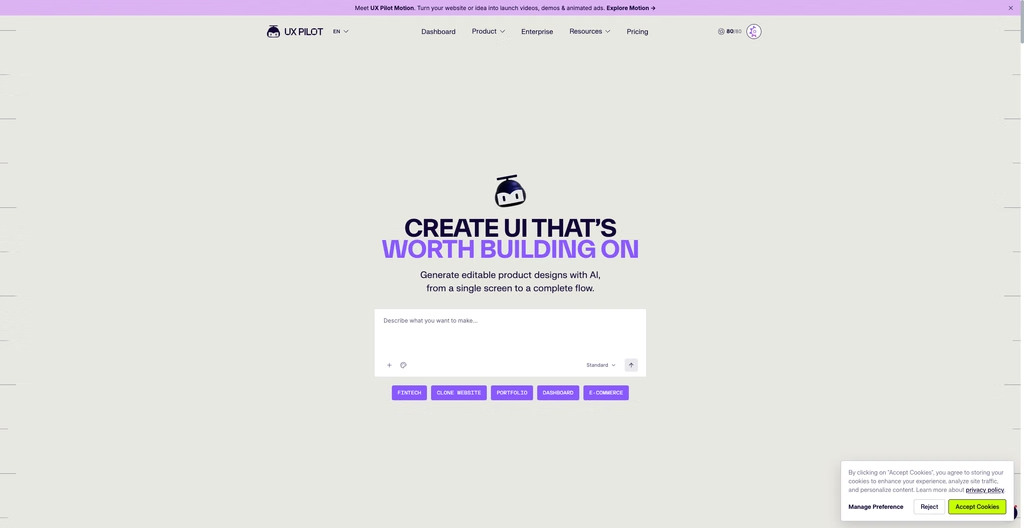
UXPilot AI is best understood as a design acceleration layer that helps users turn rough ideas into visual product concepts: wireframes, UI screens, connected flows, and prototypes. Instead of opening Figma and spending hours trying to build something from scratch, you can use this tool to describe what you want, upload a PRD or reference, and use the generated output as a starting point.
This does not only impact your workflow but also the entire project timeline. Given that many product discussions stall before there is anything concrete to react to, UXPilot shortens the distance between “we have an idea” and “here is a screen flow we can critique.”
Featured Deals and Offers
35% off UXPilot PRO annual subscription
Pay annually for a PRO account to save 35% off UXPilot
Claim DealOffers, pricing, and promo codes can change without notice. Check the official website for the latest terms.
20% off UXPilot Teams annual subscription
Save 20% off each user with an annual UXPilot Team subscription
Claim DealOffers, pricing, and promo codes can change without notice. Check the official website for the latest terms.
Get UXPilot AI offer alerts
Be the first to know about new deals, discounts, and trial offers for UXPilot AI.
Use Cases
Who Should Use This Tool?
Product managers who need something visual quickly
UXPilot is useful when a PM needs to turn a written requirement into a screen flow before a planning meeting. The output may not be final, but it can reduce abstract debate and help teams discuss actual interface decisions.
Startup founders validating product ideas
Founders often need to show investors, early customers, developers, or advisors what a product could look like before hiring a full design team. UXPilot can help create early concepts faster than manually assembling every screen.
Agencies creating first-pass concepts
For agencies, UXPilot can compress the early ideation phase. It is useful for showing layout directions, onboarding flows, dashboards, or app concepts before deep brand customization begins.
UX/UI designers exploring alternatives
Designers should not treat UXPilot as a replacement for craft. Its better role is as a variation engine. If you already have a flow and need several possible structures, UXPilot can help you get unstuck faster.
Figma-heavy teams
UXPilot’s value increases if your team already works in Figma. Nodey, UXPilot’s Figma-native agent, is positioned to generate editable Figma layers, preserve auto-layout and tokens, reuse real design systems, and refine screens through follow-up prompts.
Who Should Look Elsewhere?
If you need beginner-friendly manual editing
If your team has limited UX experience and wants a highly guided visual editor, Uizard or Visily may feel easier. Uizard’s pricing page positions it around idea-to-design workflows, AI generations, templates, and prototyping for startups and organizations. Visily also leans into accessible AI wireframing, collaboration, Figma export/import, and export-to-code features on paid plans.
If you already live entirely inside Figma
Figma’s own AI capabilities now cover early design generation, AI tools, interactions, content replacement, image tools, and agent-based workflows. Figma’s First Draft can turn ideas into editable wireframes or designs, though Figma notes that custom design-system generation was not available in that First Draft flow at the time of its help documentation.
If you want an experimental AI-native design canvas
Google Stitch is worth watching if you want a broader AI-native interface design canvas. Google describes Stitch as a tool for creating, iterating, and collaborating on high-fidelity UI from natural language, with support for exploring ideas on an infinite canvas.
Key Features and Benefits
AI Wireframe and Screen Generation
The platform’s AI design tools turn prompts into visual starting points. This is useful when a team needs to test a user flow or clarify functionality quickly:
Wireframes and Screen Flows
UXPilot can generate wireframes and connected screens for journeys such as onboarding or checkout. A designer can describe the user goal, required content, and button actions, then review the resulting flow before building it manually.
High-Fidelity UI Designs
For teams that need more than structure, the tool can produce higher-fidelity designs with visual styling, text, and interface elements. This helps stakeholders compare a dashboard, landing page, or product screen while the concept is still easy to change.
Layouts, Components, and Options
Prompt-based iteration lets users request alternate layouts, visual directions, or reusable components. These options are useful for landing-page exploration, but designers should check hierarchy, consistency, accessibility, and whether the elements support the intended experience.
Figma-Oriented Design Workflow
UXPilot fits best into a workflow where AI output becomes a draft for further design work. Confirm the current Figma handoff and export capabilities before relying on the feature, and do not assume the tool will generate clean production code.
Used carefully, these features can reduce blank-page friction without replacing design judgment. The strongest projects use UXPilot for exploration, then refine the screens, copy, components, and functionality in the team’s preferred tools.
- Generate wireframes and screen-flow concepts from prompts
- Compare layouts and design options for web, app, and landing-page projects
- Refine every output before Figma handoff or code implementation
Advanced AI-Driven Capabilities
UXPilot AI’s advanced capabilities focus on assisted design ideation rather than predictive analytics. The tool uses prompts to help users explore design directions, generate screen concepts, and move from an early plan to a clearer project workflow in less time.
AI-Assisted Design Recommendations
UXPilot AI can suggest visual directions based on the prompt, project context, and required functionality. Treat these recommendations as starting points, not verified UX rules or a replacement for professional review.
Smart Design Suggestions
The platform can propose alternate layouts, screen structures, and interface treatments for a page or product flow. Ask for several options when the first output feels generic, then check whether the hierarchy, button placement, and components support the user’s needs.
Content Optimization Insights
AI-generated text may help fill a design, but it can also produce generic copy, inaccurate claims, or the wrong tone. Review every text element and replace placeholder content before sharing the designs with stakeholders or using them in code.
Human Review and Iteration
UXPilot AI does not predict user behavior or guarantee a successful experience. It can generate a useful output, but the designer must test the functionality, accessibility, and consistency of each screen.
Design-System Alignment
AI may create inconsistent components or ignore an existing design system. Compare each result with approved patterns and revise it before moving to production.
From Concept to Production
A polished result may take a day, a month, or longer depending on the project. Use the generator to accelerate exploration, not to replace research, usability testing, or implementation planning.
Team Collaboration Tools
Collaboration features may help stakeholders review output and coordinate the next iteration. Verify current support for shared projects, comments, permissions, and Figma export before including UXPilot in a team workflow.
The strongest process combines AI exploration with human critique, clear ownership, and a final implementation check.
User Experience
Setup and Ease of Use
Users who use AI chat apps are likely to find UX Pilot’s interface familiar. Once you sign in, you’re greeted with a big chat box on a dashboard screen that looks a lot like ChatGPT or Claude.
All you need to do is type in a description of what you want UX Pilot to create. Of course, you don’t want to feed vague instructions. It’s usually best to provide as much information as possible, such as the type of page you want to build, the business goals and context, target audience, and even brand voice or messaging guidelines.
UXPilot’s user experience is likely to feel best when you treat it as a collaborator rather than a finished-product factory.
The workflow is strongest when you:
- Start with a clear prompt or PRD.
- Generate multiple variants.
- Select the strongest structure.
- Refine the screen or flow inside UXPilot or Figma.
- Apply your design system.
- Review usability, accessibility, content, and brand fit.
- Test with stakeholders or users.
UXPilot is useful because it helps teams make decisions faster.
Testing Results and Limitations
Where users may feel friction is prompt quality. AI tools do not remove effort; they often move effort upstream. Instead of manually drawing every screen, you spend more time defining constraints, explaining context, and correcting the model’s assumptions.
That trade-off is acceptable for teams that value fast exploration. It is frustrating for users who expect one prompt to produce final work.
Pricing and Value
| Plan | Price | Main fit | Important limits or notes | Action |
|---|---|---|---|---|
| Free | $0 | Testing Pro features before you commit | 80/day credits (daily, no rollover) | Get FREE trial |
| PRO | $29/month | Freelancers, solopreneurs, individual users | 750 credits (monthly) | Sign up for a PRO account |
| Teams | $39/user/month | Agencies, small businesses, startups | 900 credits/user (monthly) | Sign up for a Teams account |
| Enterprise | Custom | Mid-market and Enterprise | Custom credits | Get UXPilot Enterprise |
Which Plan Offers the Best Value?
UXPilot’s paid plans start at $29/month for single users who want to enjoy more premium features such as exporting to Figma and code and a website cloner. Agencies and teams that want to add more users can upgrade to a Teams account for $39/user per month. Companies with volume needs can get the Enterprise account with customized pricing depending on their needs.
Like most AI design tools, UXPilot uses credits, generation limits, or plan-based feature gates. UXPilot’s terms also state that it may modify required tokens based on computational costs and that it monitors usage patterns to prevent abuse and ensure fair use.
Before upgrading, estimate:
- How many screens your team generates per week.
- How often you regenerate because the output misses the mark.
- Whether you need Figma export, code export, image-to-design, or unlimited flows.
- Whether generated work will be used commercially.
- Whether your team needs design-system support.
Additional Costs and Restrictions
Also note that while UXPilot offers a FREE plan, its terms state that free-plan users may only use generated designs for personal, non-commercial purposes. On the other hand, Pro and higher subscribers receive commercial usage rights. This means that the free plan is better treated as evaluation, not production usage.
Pros and Cons
Strengths
✅ Fast first drafts
UXPilot helps teams move from idea to screen without waiting for a full design cycle.
✅ Useful for product flows
Multi-screen generation is more useful than one-off screen mockups for real product work.
✅ Strong Figma positioning
Nodey and Figma-focused workflows reduce the translation burden for teams already working in Figma.
✅ Design-system potential
Component import and managed design-system services can help mature teams reduce brand drift.
✅ Good ideation value
The tool is well suited to exploring layouts, variants, and early directions.
✅ Prototype and code paths
React prototype and export features can help bridge concept work and technical exploration.
Trade-offs
⚠️ Outputs still need judgment
UXPilot can generate structure, but it cannot fully understand your business, users, or constraints without guidance.
⚠️ Prompting is work
Teams need to learn how to describe product context, user goals, states, and constraints clearly.
⚠️ Brand alignment may require setup
Generic output will need refinement unless your design system is connected and maintained.
⚠️ Credit-based pricing can be hard to forecast
Heavy iteration can make a low-cost plan feel restrictive.
⚠️ AI validation is not user testing
Predictive heatmaps and design review can help, but they do not replace research.
Frequently Asked Questions
Is UXPilot AI good for real product design?
Yes, if you use it for early design acceleration, layout exploration, product flows, and Figma-ready iteration. It should not replace UX strategy, research, accessibility checks, or designer review.
Can UXPilot AI replace a UX designer?
No. It can reduce repetitive first-draft work, but it does not replace product thinking, user research, prioritization, brand judgment, or usability validation.
Is UXPilot AI good for Figma users?
Yes, Figma users are one of the strongest-fit audiences. UXPilot promotes Figma integration, Nodey, editable Figma layers, auto-layout preservation, and design-system reuse.
Can I use UXPilot AI designs commercially?
According to UXPilot’s terms, free-plan users may only use generated designs for personal, non-commercial purposes, while Standard and Pro subscribers receive commercial usage rights.
Does UXPilot train on my generated designs?
UXPilot’s terms state that it does not train AI models using generated designs or confidential information, though it may use anonymized usage data to improve the service.
Is UXPilot AI worth it?
UXPilot is worth considering if your team regularly needs to turn ideas, PRDs, sketches, or product concepts into reviewable UI quickly. It is less worthwhile if you only need occasional simple mockups or if you are unwilling to refine AI output.
Bottom Line
UXPilot AI is a strong fit for teams that need to move faster from idea to interface.
Its real value is not that it creates perfect screens. It helps teams stop debating in the abstract. It gives founders, PMs, designers, and agencies something concrete to critique, refine, and test.
Buy UXPilot if your workflow is Figma-heavy, your team needs faster first drafts, and you are comfortable guiding AI with clear prompts and design constraints.
Skip it if you expect production-ready UI without review, dislike prompt-based tools, or mainly need a beginner-friendly visual editor.
The best way to use UXPilot is simple: generate several variants, choose the strongest structure, refactor it into your design system, then test the flow with real users or stakeholders.
That is where UXPilot becomes more than an AI design novelty. It becomes a decision-making accelerator.
Overview
UXPilot AI Review: Fast Screens, Figma Workflows, and the Friction to Plan For
⚡️Quick verdict
UXPilot AI is best for teams that need speed-to-clarity: founders validating a product idea, product managers turning PRDs into screens, agencies preparing early client concepts, and UX/UI designers exploring alternate layouts before committing to a direction.
It is less compelling if you expect AI to produce polished, production-ready product design with no direction. Like most AI design tools, UXPilot still needs strong prompts, clear constraints, and human judgment.
The biggest advantage is workflow acceleration. UXPilot can generate UI from prompts, PRDs, sketches, screenshots, and website references; create multi-screen flows; support Figma workflows through its Nodey agent; and export code or React prototypes depending on the use case.
What is
UXPilot AI
UXPilot AI is best understood as adesign acceleration layer.
It helps users turn rough ideas into visual product concepts: wireframes, UI screens, connected flows, and prototypes. Instead of opening Figma and building from scratch, you can describe what you want, provide a PRD or reference, and use the generated output as a starting point.
That matters because many product discussions stall before there is anything concrete to react to. UXPilot shortens the distance between “we have an idea” and “here is a screen flow we can critique.”
This is where the tool is most useful:
- Turning a product requirement into early UI direction.
- Exploring multiple layout options for the same screen.
- Creating wireframes for onboarding, checkout, dashboards, SaaS flows, or mobile apps.
- Giving stakeholders something visual before investing design sprint time.
- Moving generated work into Figma for review and refinement.
UXPilot is not a complete substitute for UX strategy, user research, information architecture, brand design, accessibility review, or product judgment.
Featured deals and offers
35% off UXPilot PRO annual subscription
Pay annually for a PRO account to save 35% off UXPilot
Claim DealOffers, pricing, and promo codes can change without notice. Check the official website for the latest terms.
20% off UXPilot Teams annual subscription
Save 20% off each user with an annual UXPilot Team subscription
Claim DealOffers, pricing, and promo codes can change without notice. Check the official website for the latest terms.
UXPilot AI
is best for
Product managers who need something visual quickly
UXPilot is useful when a PM needs to turn a written requirement into a screen flow before a planning meeting. The output may not be final, but it can reduce abstract debate and help teams discuss actual interface decisions.
Startup founders validating product ideas
Founders often need to show investors, early customers, developers, or advisors what a product could look like before hiring a full design team. UXPilot can help create early concepts faster than manually assembling every screen.
Agencies creating first-pass concepts
For agencies, UXPilot can compress the early ideation phase. It is useful for showing layout directions, onboarding flows, dashboards, or app concepts before deep brand customization begins.
UX/UI designers exploring alternatives
Designers should not treat UXPilot as a replacement for craft. Its better role is as a variation engine. If you already have a flow and need several possible structures, UXPilot can help you get unstuck faster.
Figma-heavy teams
UXPilot’s value increases if your team already works in Figma. Nodey, UXPilot’s Figma-native agent, is positioned to generate editable Figma layers, preserve auto-layout and tokens, reuse real design systems, and refine screens through follow-up prompts.
Who should look elsewhere
UXPilot is not the best fit for everyone.
Choose something else if you need beginner-friendly manual editing
If your team has limited UX experience and wants a highly guided visual editor, Uizard or Visily may feel easier. Uizard’s pricing page positions it around idea-to-design workflows, AI generations, templates, and prototyping for startups and organizations. Visily also leans into accessible AI wireframing, collaboration, Figma export/import, and export-to-code features on paid plans.
Choose something else if your work is mostly marketing websites
Relume is often a better fit for website planning because it starts with sitemaps, wireframes, style guides, and exports to Figma, Webflow, or React. It is more structured around marketing-site production than general product UI exploration.
Choose something else if you already live entirely inside Figma
Figma’s own AI capabilities now cover early design generation, AI tools, interactions, content replacement, image tools, and agent-based workflows. Figma’s First Draft can turn ideas into editable wireframes or designs, though Figma notes that custom design-system generation was not available in that First Draft flow at the time of its help documentation.
Choose something else if you want an experimental AI-native design canvas
Google Stitch is worth watching if you want a broader AI-native interface design canvas. Google describes Stitch as a tool for creating, iterating, and collaborating on high-fidelity UI from natural language, with support for exploring ideas on an infinite canvas.
UXPilot AI
key features and benefits
AI wireframes and UI screens
UXPilot can generate low-fidelity and high-fidelity interface screens from prompts and other inputs. The business value is speed: teams can move from a product idea to a reviewable screen faster than traditional manual wireframing.
That does not mean the first screen is the right screen. It means the team has something concrete enough to improve.
Multi-screen flows
UXPilot’s Autoflow positioning is important because product work rarely happens one screen at a time. A checkout flow, onboarding journey, account setup process, or SaaS dashboard path needs connected screens.
Generating a flow helps product teams review continuity: what happens next, where users might get stuck, and whether the sequence makes sense.
Figma workflow and Nodey
This is one of UXPilot’s strongest positioning points. Nodey is described as a Figma-native AI design agent that works inside the Figma file, generates UI from prompts, PRDs, or references, and returns editable Figma layers with auto-layout and tokens preserved.
For real teams, that matters because the cost of AI design is often not generation. It is translation.
If an AI tool produces something that your team must rebuild manually in Figma, the time savings shrink. UXPilot’s Figma workflow is designed to reduce that gap.
Design-system support
UXPilot supports self-serve design-system workflows by importing Figma components and saving them as custom models. For larger organizations, it also offers a managed design-system service where UXPilot’s team audits Figma components, ingests tokens, and validates output with design and engineering leads.
This is valuable for mature teams, but it also introduces a practical trade-off: better brand alignment requires setup. If you skip that setup, expect more generic output.
React prototypes and code export
UXPilot’s React Focus Mode is positioned as an end-to-end environment for generating, editing, and exporting React prototypes, including visual editing, live chat edits, code editing, and full codebase export.
For product teams, this can reduce the gap between concept and interactive prototype. For engineering teams, the output should still be reviewed carefully. AI-generated code can be useful as a starting point, but it should not bypass normal engineering standards.
Predictive heatmaps and design review
UXPilot includes predictive heatmaps and automated design review in its stated capabilities.
These features can help identify obvious hierarchy or attention problems early, but they should not be treated as a replacement for usability testing. A predictive heatmap can suggest where attention might go. It cannot confirm whether real users understand the value proposition, complete the task, or trust the interface.
Problems Solved
- Blank-canvas friction: Helps teams create an initial design direction without starting from zero.
- Slow stakeholder alignment: Turns abstract product ideas into screens people can critique.
- Layout exploration: Generates alternatives so teams can compare options before committing.
- Early product validation: Makes it easier to test concepts before investing heavily in design polish.
- Figma handoff friction: Supports workflows that move generated designs into Figma for refinement.
- Design-system drift: Offers ways to reuse Figma components and brand rules, especially for teams willing to configure design-system support.
- Prototype speed: Helps teams create interactive or code-exportable prototypes faster than manually building every screen.
UXPilot AI
user experience: what using it feels like
UXPilot’s user experience is likely to feel best when you treat it as a collaborator rather than a finished-product factory.
The workflow is strongest when you:
- Start with a clear prompt or PRD.
- Generate multiple variants.
- Select the strongest structure.
- Refine the screen or flow inside UXPilot or Figma.
- Apply your design system.
- Review usability, accessibility, content, and brand fit.
- Test with stakeholders or users.
The draft’s strongest point is worth preserving: UXPilot is useful because it helps teams make decisions faster. A screen is not the final goal. Clarity is the goal.
Where users may feel friction is prompt quality. AI tools do not remove effort; they often move effort upstream. Instead of manually drawing every screen, you spend more time defining constraints, explaining context, and correcting the model’s assumptions.
That trade-off is acceptable for teams that value fast exploration. It is frustrating for users who expect one prompt to produce final work.
UXPilot AI
pricing and value
| Plan | Price | Main fit | Important limits or notes | Action |
|---|---|---|---|---|
| Free | $0 | Testing Pro features before you commit | 80/day credits (daily, no rollover) | Get FREE trial |
| PRO | $29/month | Freelancers, solopreneurs, individual users | 750 credits (monthly) | Sign up for a PRO account |
| Teams | $39/user/month | Agencies, small businesses, startups | 900 credits/user (monthly) | Sign up for a Teams account |
| Enterprise | Custom | Mid-market and Enterprise | Custom credits | Get UXPilot Enterprise |
UXPilot’s paid plans start at$29/month for single users who want to enjoy more premium features such as exporting to Figma and code and a website cloner. Agencies and teams that want to add more users can upgrade to a Teams account for $39/user per month. Companies with volume needs can get the Enterprise account with customized pricing depending on their needs.
Like most AI design tools, UXPilot uses credits, generation limits, or plan-based feature gates. UXPilot’s terms also state that it may modify required tokens based on computational costs and that it monitors usage patterns to prevent abuse and ensure fair use.
Before upgrading, estimate:
- How many screens your team generates per week.
- How often you regenerate because the output misses the mark.
- Whether you need Figma export, code export, image-to-design, or unlimited flows.
- Whether generated work will be used commercially.
- Whether your team needs design-system support.
Also note that while UXPilot offers a FREE plan, its terms state that free-plan users may only use generated designs for personal, non-commercial purposes. On the other hand, Pro and higher subscribers receive commercial usage rights.This means that the free plan is better treated as evaluation, not production usage.
UXPilot AI
pros and cons
Pros
 Fast first drafts
 Fast first drafts
UXPilot helps teams move from idea to screen without waiting for a full design cycle.
Useful for product flows
Multi-screen generation is more useful than one-off screen mockups for real product work.
Strong Figma positioning
Nodey and Figma-focused workflows reduce the translation burden for teams already working in Figma.
Design-system potential
Component import and managed design-system services can help mature teams reduce brand drift.
Good ideation value
The tool is well suited to exploring layouts, variants, and early directions.
Prototype and code paths
React prototype and export features can help bridge concept work and technical exploration.
Cons
Outputs still need judgment
 Outputs still need judgment
UXPilot can generate structure, but it cannot fully understand your business, users, or constraints without guidance.
Prompting is work
Teams need to learn how to describe product context, user goals, states, and constraints clearly.
Brand alignment may require setup
Generic output will need refinement unless your design system is connected and maintained.
Credit-based pricing can be hard to forecast
Heavy iteration can make a low-cost plan feel restrictive.
AI validation is not user testing
Predictive heatmaps and design review can help, but they do not replace research.
UXPilot AI
frequently asked questions
Is UXPilot AI good for real product design?
Yes, if you use it for early design acceleration, layout exploration, product flows, and Figma-ready iteration. It should not replace UX strategy, research, accessibility checks, or designer review.
Can UXPilot AI replace a UX designer?
No. It can reduce repetitive first-draft work, but it does not replace product thinking, user research, prioritization, brand judgment, or usability validation.
Is UXPilot AI good for Figma users?
Yes, Figma users are one of the strongest-fit audiences. UXPilot promotes Figma integration, Nodey, editable Figma layers, auto-layout preservation, and design-system reuse.
Can I use UXPilot AI designs commercially?
According to UXPilot’s terms, free-plan users may only use generated designs for personal, non-commercial purposes, while Standard and Pro subscribers receive commercial usage rights.
Does UXPilot train on my generated designs?
UXPilot’s terms state that it does not train AI models using generated designs or confidential information, though it may use anonymized usage data to improve the service.
Is UXPilot AI worth it?
UXPilot is worth considering if your team regularly needs to turn ideas, PRDs, sketches, or product concepts into reviewable UI quickly. It is less worthwhile if you only need occasional simple mockups or if you are unwilling to refine AI output.